
Preparation
Environment Requirements
- Operating System Requirements:
- Windows
- MacOS
- Linux
- Solaris
- Programming Language Version Requirements: Java JDK 1.7 (64-bit) and above.
Installing Java Development Kit
We recommend JDK 1.8 or later. Run java -version in a terminal to check your installed version.
Visit the Oracle JDK download page, select the package for your operating system, and follow the installation instructions.
Amazon Corretto is a free OpenJDK distribution that does not require an Oracle account and provides free long-term support:
- Visit the Corretto download page
- Select the package for your operating system
Eclipse Adoptium is a community-maintained OpenJDK distribution:
- Visit the Adoptium download page
- Select a JDK version and operating system
Install the Tiger OpenAPI Java SDK
Add the dependency to your project's pom.xml:
<dependency>
  <groupId>io.github.tigerbrokers</groupId>
  <artifactId>openapi-java-sdk</artifactId>
  <version>2.7.0</version>
</dependency>
If the SDK cannot be downloaded, try adding the following repository to pom.xml:
<repositories>
  <repository>
    <id>sonatype-public</id>
    <name>sonatype-public</name>
    <url>https://oss.sonatype.org/content/groups/public/</url>
  </repository>
</repositories>
Add the dependency to build.gradle:
dependencies {
    implementation 'io.github.tigerbrokers:openapi-java-sdk:2.7.0'
}
The SDK source code is hosted on GitHub and Gitee:
- GitHub: tigerfintech/openapi-java-sdk
- Gitee: tigerbrokers/openapi-java-sdk
git clone https://github.com/tigerfintech/openapi-java-sdk.git
cd openapi-java-sdk
mvn clean install
Development Tools
Tiger OpenAPI works with popular AI coding tools (Cursor, Windsurf, Trae, VS Code + GitHub Copilot, Claude Code, Kiro, etc.) and traditional IDEs (IntelliJ IDEA, VS Code). Place the configuration file in your project directory and AI tools can automatically read the documentation to generate SDK code. See AI Skill and MCP Server for setup.
Register as a Retail Developer
Before using the API, please first open permissions. Individual users should visit the API official website to register developer identity.
We recommend using Chrome browser to open.
To activate Tiger OpenAPI, open and fund a Tiger account. The developer and user must also sign an API authorization agreement.
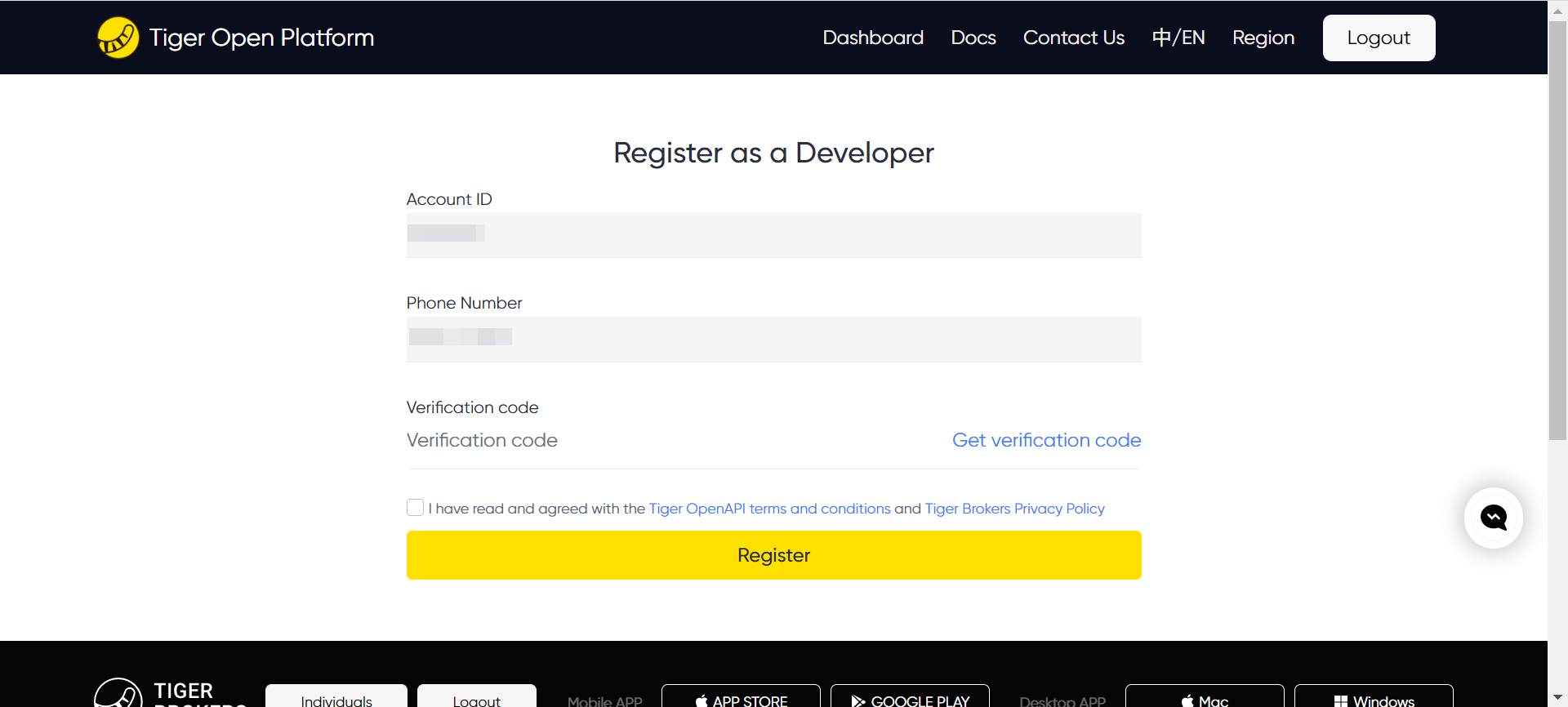
You will then need to complete the registration of developer information on this page. Please fill in and submit your information.
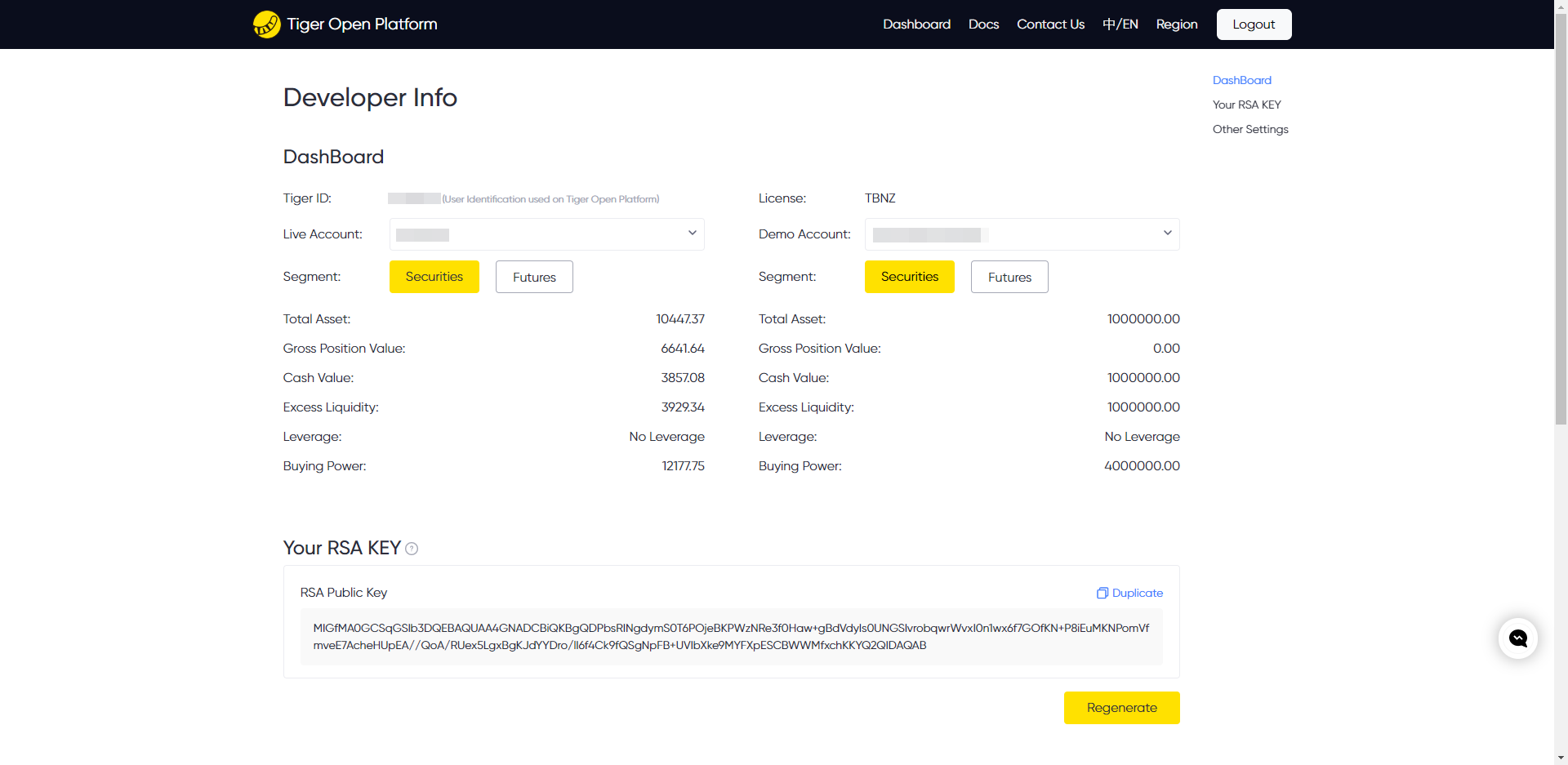
After successful registration, you can obtain the following information on this page:
- tigerId: A unique ID assigned by the Open Platform to identify each developer. Every API call includes the tigerId.
- account: The user's trading account, which is required for trading-related API requests. Accounts are classified as Global, Prime, or Paper:
- Global Account: Starts with uppercase letter U, such as: U12300123,
- Prime Account: A shorter string of numbers (5 to 10 digits), such as: 51230321,
- Paper Trading Account: 17 digits, such as: 20191106192858300,
After registration, the page lists funded live trading accounts and the user's paper trading account. If both the Global and Prime accounts are funded, both live accounts are listed.
Developer Registration Page: You can register with your mobile phone number and verification code.
Developer Information Page: This page provides the Tiger ID, live trading accounts, paper trading account, license, and other values required by Tiger OpenAPI.
Note: Save the private key shown below locally before refreshing the page. Tiger Brokers does not store it, and it disappears after the page is refreshed. Keep it secure and use Regenerate immediately if it is lost or exposed.
After regenerating, download the tiger_openapi_config.properties file locally. Copy the tiger_openapi_config.properties file to the directory configured by ClientConfig.DEFAULT_CONFIG.configFilePath.
The configuration exported from the Developer Center takes precedence. You can also use the shared configuration template: copy it, remove the .example suffix, and replace the placeholders. Never commit credentials.
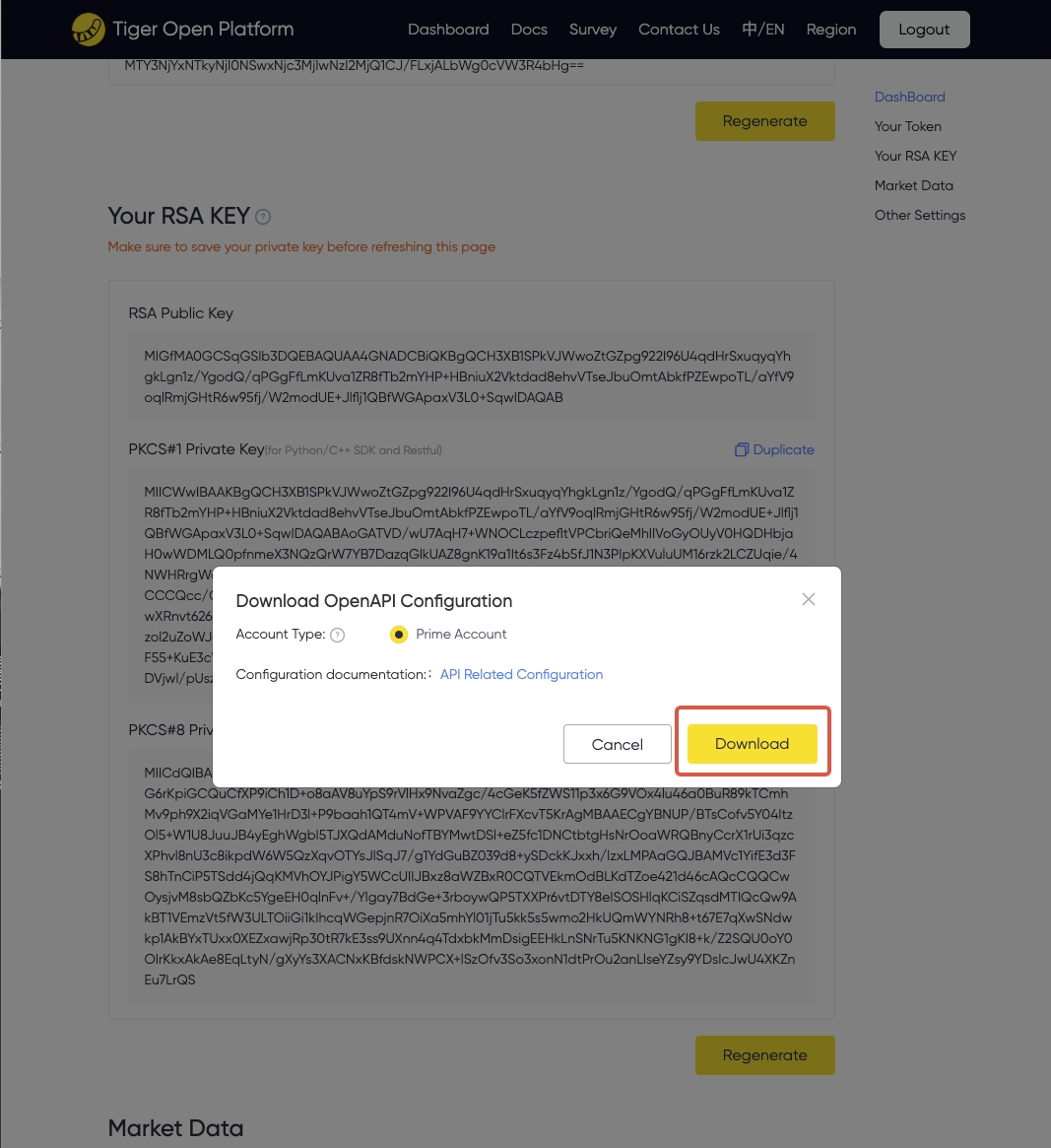
The tiger_openapi_config.properties file uses the following format. The account value selects the default live or paper trading account.
private_key_pk8=MIICeAIBADANBgkqhkiG9w0BAQEFAASCAmIwggJeAgEAAoGBAKh0zh8zlzP62PxJS7HFJtIwXE0czbeF+2MC5ev1MfB7IW1OYD+bHCj0dgSFiPEKBgAm3vzFvPDtqIq76kjjk7yKXyezpQveZPn1CUIq7T4VmYXaDni17KqiKiXvXFwzT3oPeyzSgnMoa35u2+UHN1ytczr6lmpsrXgBJYYTi4ERAgMBAAECgYBfmIGMVVOeDOFsMhABnvcL2qPWotzfI+pn4rIluCyR4t4yUILwNY7CcxAyOrFe0Chdl7F9Up2JP+UgbcljebpRHN9jAm3lVQP0t4hzI/G6PsSDa/GVnAnqyVPsNDoskJtR7U9QOUopdh7/ARQ0nd0Qn94USFHy83IWVbwMmP5rPQJBAOFDBhRkhyr71YNxJ6flKbmhLvrlowDJZw52SmiRq759n8f03BPRT6NoQfKzBkwkFMMnjaJLwdXQy4Z20snsnMcCQQC/cWrUAccnVPLG1/9VYcFF/HfTg0WUNfzsmLu7K/W37TllhVPRTxDkJQ90EDdB7EwEp3WLoFdQf/E5jlpf5StnAkEApHt6Pv3ArSRCHb5MRI5Sz1bgpRd01Kg7dhXt8zka/Pdh6nHjGR1nV1xTe1I5sPNPrch95RoIKYZSdpbhB8ycFQJBAIw6wrqatst7sP2wGArtuQnPveID5QKEbUjNM64NrEZWkNVpTRUjakcDUod8nU0/jgtWsoZdI7gGj6bOPCrEDf8CQQCkDyuhQpe0pOoLatvyGzkCxwykcVSXtltV4pfXiACD1A9bGSHwFwHV2WMCyunuKsS2rhV7MPYJ/jRvnYVzH6m8
tiger_id=YOUR_TIGER_ID
account=12345678
license=TBHK
env=PROD
Token (Optional)
TBHK License (users with other licenses can ignore this), you need to generate a token. After the token expires, you need to regenerate it and download the tiger_openapi_token.properties file locally. Copy the tiger_openapi_token.properties file to the directory configured by ClientConfig.DEFAULT_CONFIG.configFilePath.
For an account that requires a local token file, use the shared token template, remove the .example suffix, and replace the placeholders.
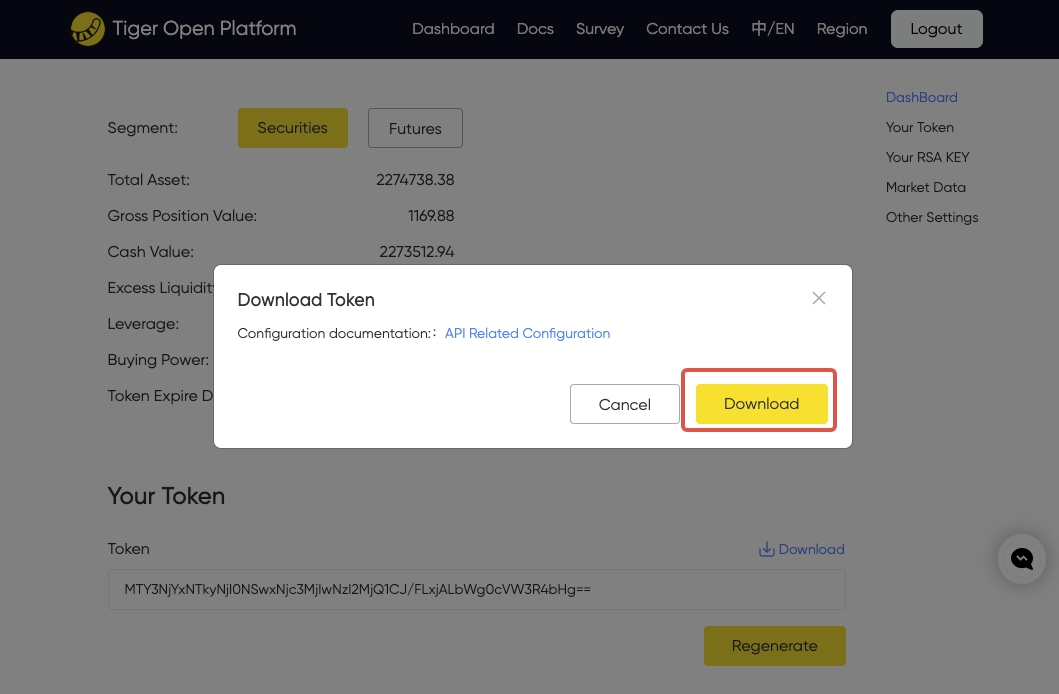
The token is valid for 30 days. If it expires, regenerate and export a token file from the developer information page. Before expiration, you can renew it through the token refresh API. Automatic refresh is disabled by default. When clientConfig.isAutoRefreshToken = true, the SDK refreshes the token every five days and updates the local tiger_openapi_token.properties file. Use refreshTokenIntervalDays and refreshTokenTime to change the schedule. Set clientConfig.isAutoRefreshToken = false if your application manages refreshes.
Additional Configuration (Optional):
| Information | Required | Description |
|---|---|---|
| IP Whitelist | No | Restricts API access to listed IP addresses. Separate multiple IPs with ;. |
| Callback URL | No | The callback address of the user application, which can be used to receive order, position, and asset change messages. Optional, users can also directly receive callback messages through the subscription API provided by the SDK |
Register as an Institutional Developer
Institutional users please visit Institution Account Center
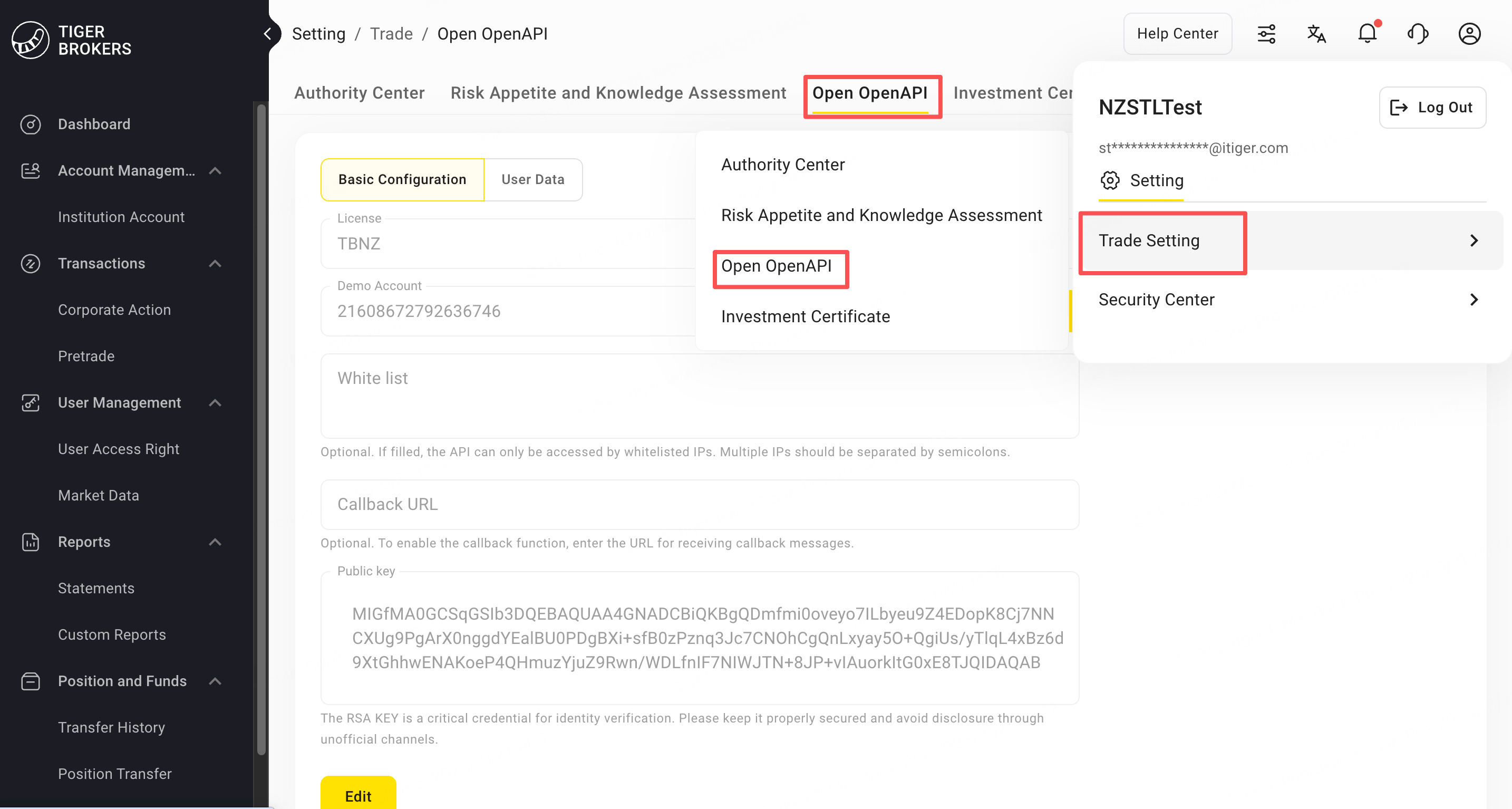
After the account is opened and funds are injected, you can log in to the Tiger account in the institution account center and go to "Trading Settings > Open OpenAPI" to complete the opening process.
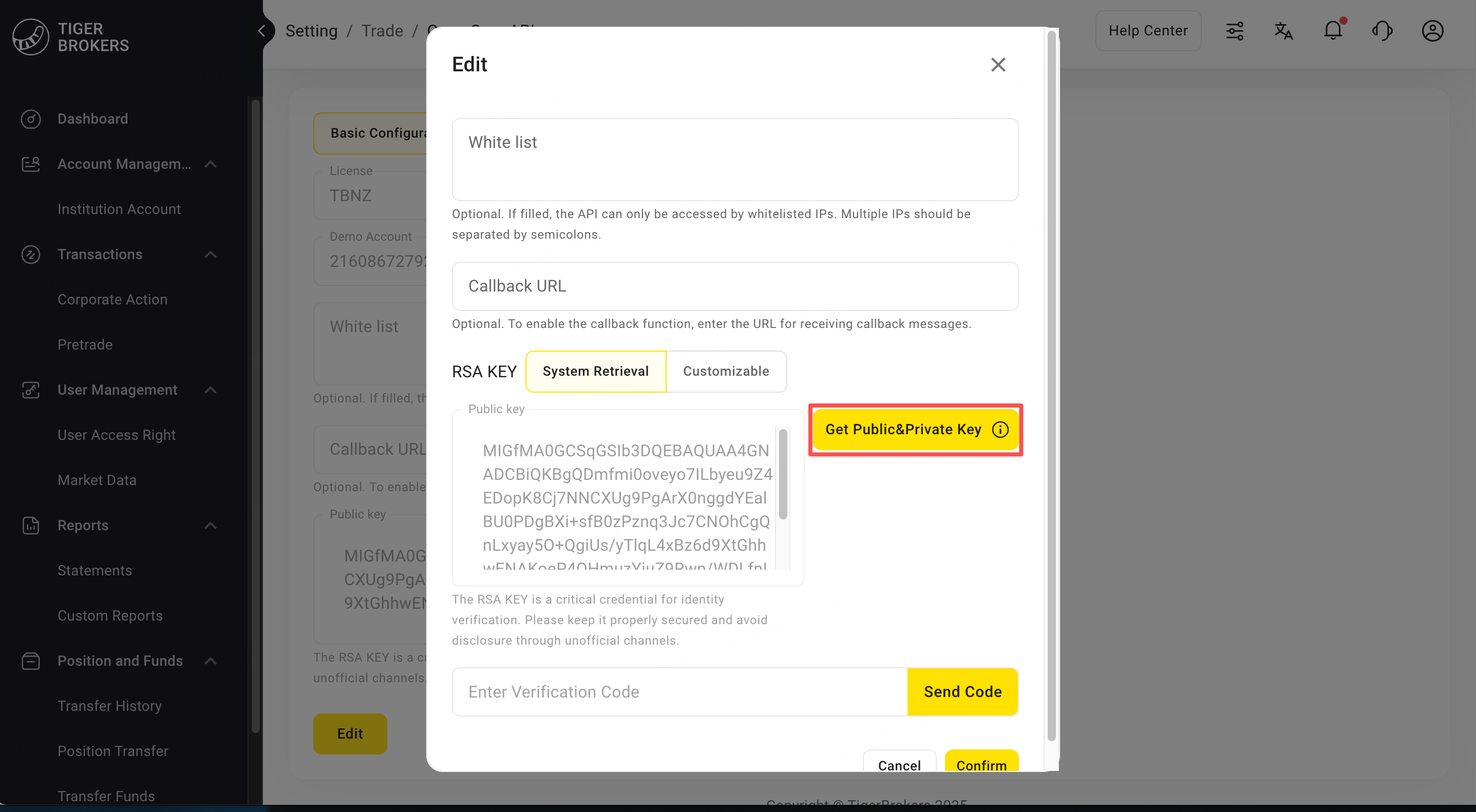
You can obtain public and private keys on the basic configuration page
- When enabling or regenerating public and private keys, you only need to click "Get Public and Private Keys" to automatically generate the key information.
- If you don't need the keys we generate, you can choose custom, copy and paste your public key into the form to complete saving and confirmation.
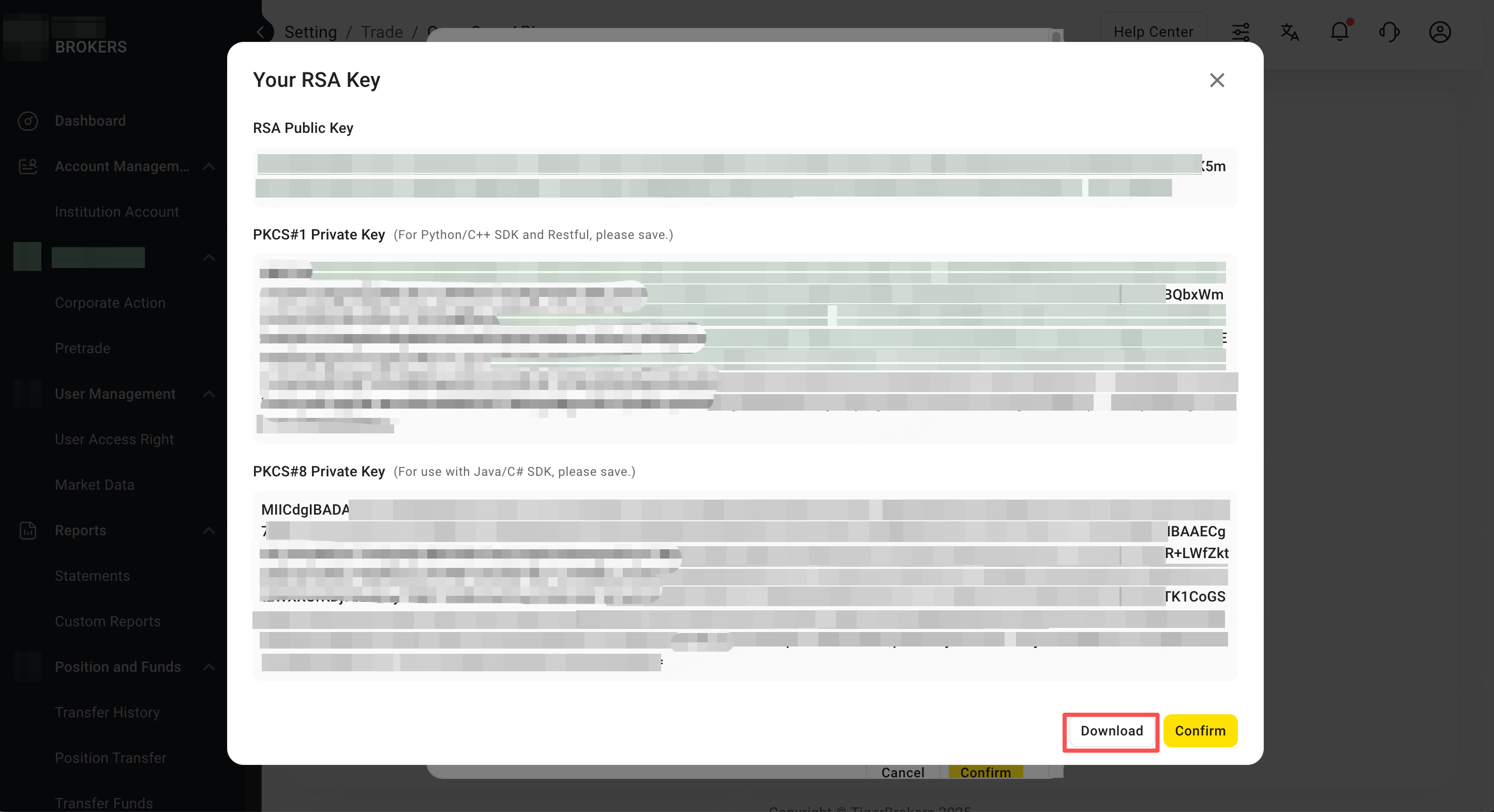
Note: Save or download the private key and keep it secure because Tiger Brokers does not store it. Regenerate it immediately if it is lost or exposed.
Private Key Format Instructions:
- The Java SDK supports only PKCS#8 private keys (
BEGIN PRIVATE KEY).
Note: If an SDK call fails, first verify that the private key is in PKCS#8 format.
Prepare the configuration file named tiger_openapi_config.properties. The file format is as follows:
Use the shared configuration template as a reference; configuration exported from the Developer Center takes precedence. Never commit credentials.
- Set
private_key_pk8using the private-key file downloaded from the Institution Center. - account can be set to the target account you have permission to operate, and supports switching between live and paper trading accounts.
- secret_key can be obtained from the Institution Center.
If your account requires a local token file, use the shared token template, remove the .example suffix, replace the placeholders, and obtain the token from the Institution Center.
private_key_pk8=MIICeAIBADANBgkqhkiG9w0BAQEFAASCAmIwggJeAgEAAoGBAKh0zh8zlzP62PxJS7HFJtIwXE0czbeF+2MC5ev1MfB7IW1OYD+bHCj0dgSFiPEKBgAm3vzFvPDtqIq76kjjk7yKXyezpQveZPn1CUIq7T4VmYXaDni17KqiKiXvXFwzT3oPeyzSgnMoa35u2+UHN1ytczr6lmpsrXgBJYYTi4ERAgMBAAECgYBfmIGMVVOeDOFsMhABnvcL2qPWotzfI+pn4rIluCyR4t4yUILwNY7CcxAyOrFe0Chdl7F9Up2JP+UgbcljebpRHN9jAm3lVQP0t4hzI/G6PsSDa/GVnAnqyVPsNDoskJtR7U9QOUopdh7/ARQ0nd0Qn94USFHy83IWVbwMmP5rPQJBAOFDBhRkhyr71YNxJ6flKbmhLvrlowDJZw52SmiRq759n8f03BPRT6NoQfKzBkwkFMMnjaJLwdXQy4Z20snsnMcCQQC/cWrUAccnVPLG1/9VYcFF/HfTg0WUNfzsmLu7K/W37TllhVPRTxDkJQ90EDdB7EwEp3WLoFdQf/E5jlpf5StnAkEApHt6Pv3ArSRCHb5MRI5Sz1bgpRd01Kg7dhXt8zka/Pdh6nHjGR1nV1xTe1I5sPNPrch95RoIKYZSdpbhB8ycFQJBAIw6wrqatst7sP2wGArtuQnPveID5QKEbUjNM64NrEZWkNVpTRUjakcDUod8nU0/jgtWsoZdI7gGj6bOPCrEDf8CQQCkDyuhQpe0pOoLatvyGzkCxwykcVSXtltV4pfXiACD1A9bGSHwFwHV2WMCyunuKsS2rhV7MPYJ/jRvnYVzH6m8
tiger_id=YOUR_TIGER_ID
account=12345678
license=TBHK
env=PROD
secret_key=fcfca571-71db-35c1-9352-9a557cc8258d
After successful registration, you can obtain the following information in user profile:
- Username: The name used when logging into the institution center
- User ID: User ID
- Tiger ID: Developer unique identifier (required parameter for all API calls)
- Secret Key: Trader key, institutional users need to set this key in the config.properties configuration file for secure authentication of API requests
- Account ID: The user's trading account ID, which is required for trading-related API requests. Click "Edit" to view the user's Account ID
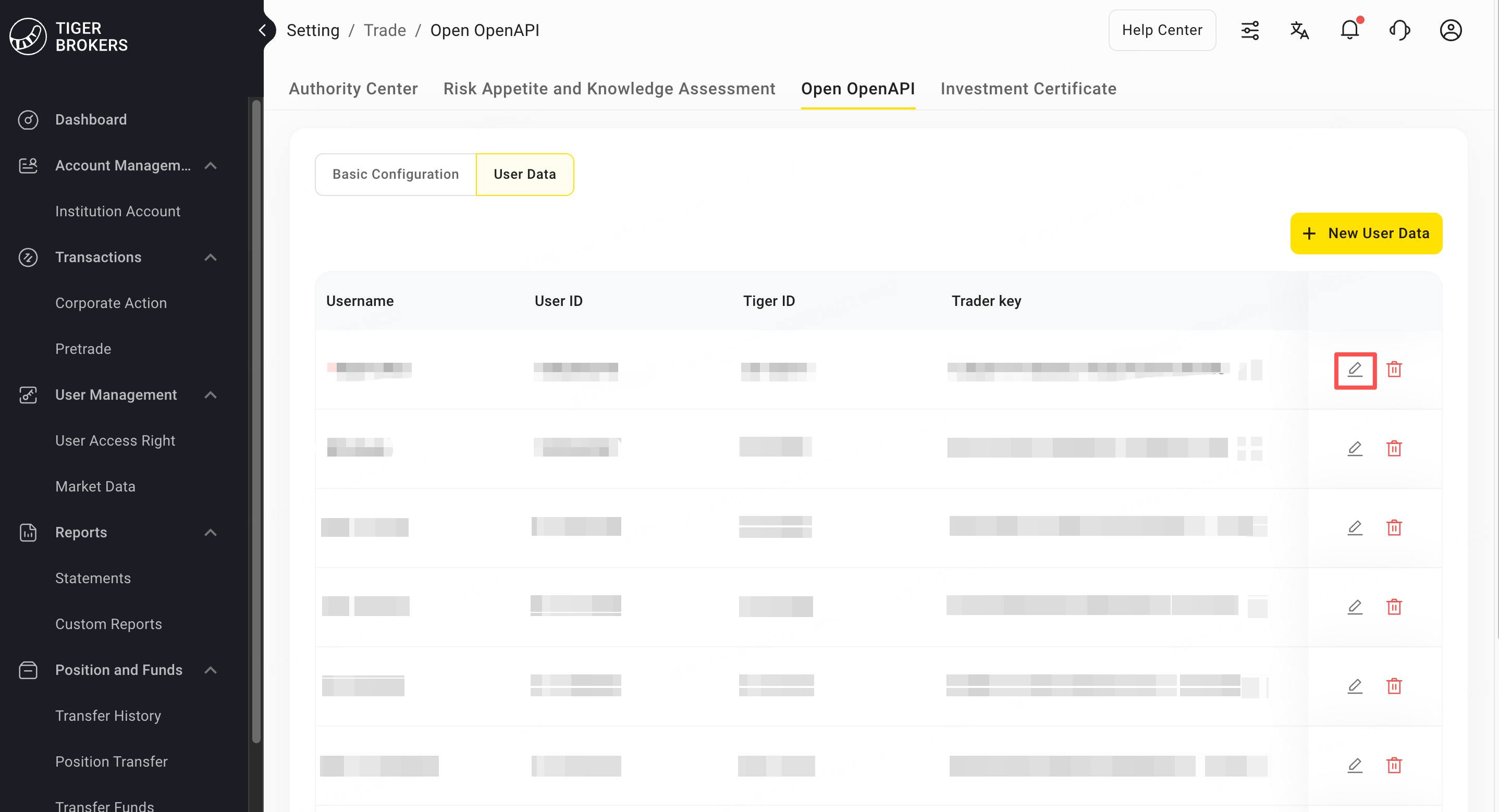
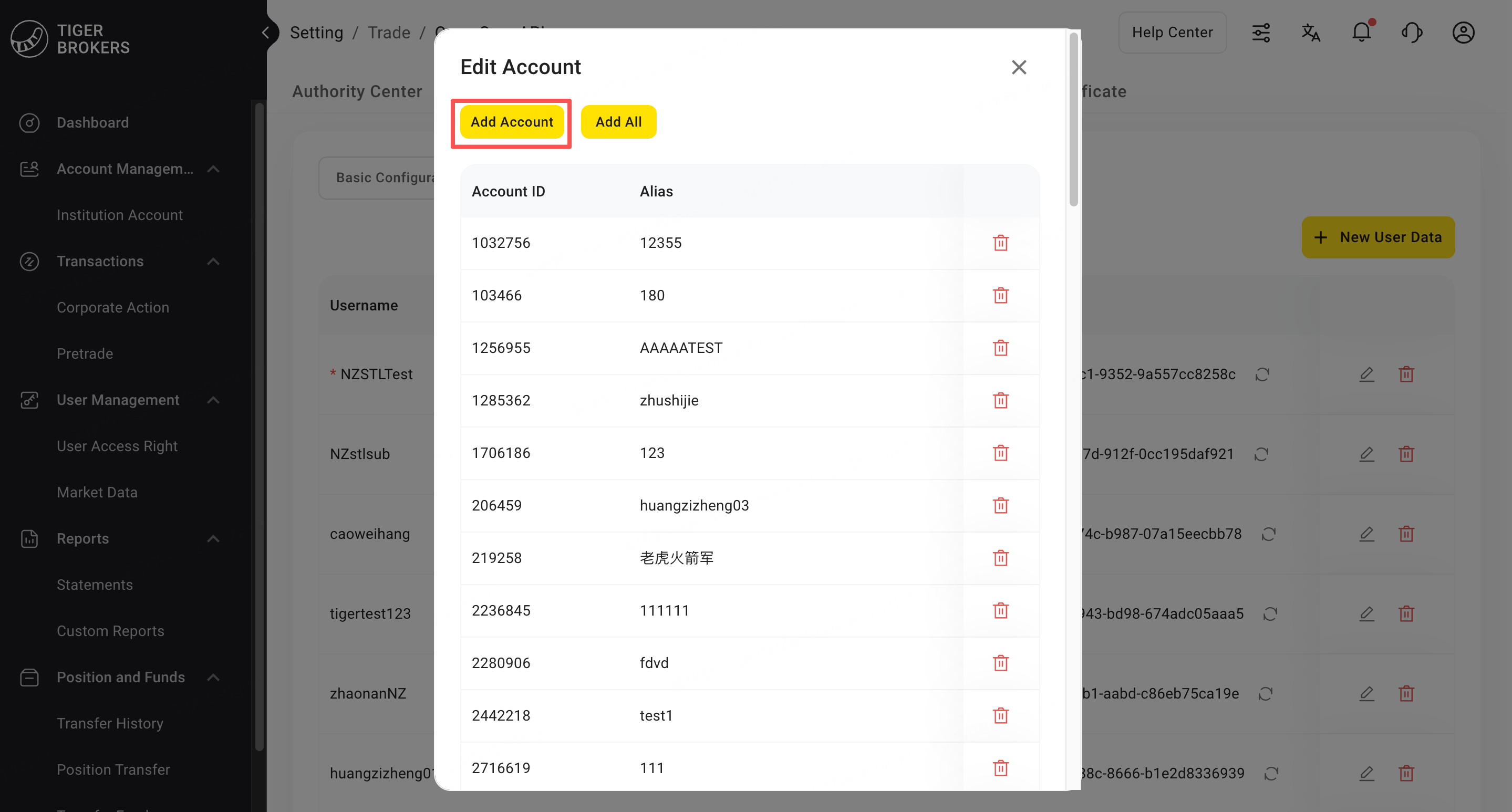
Special Note
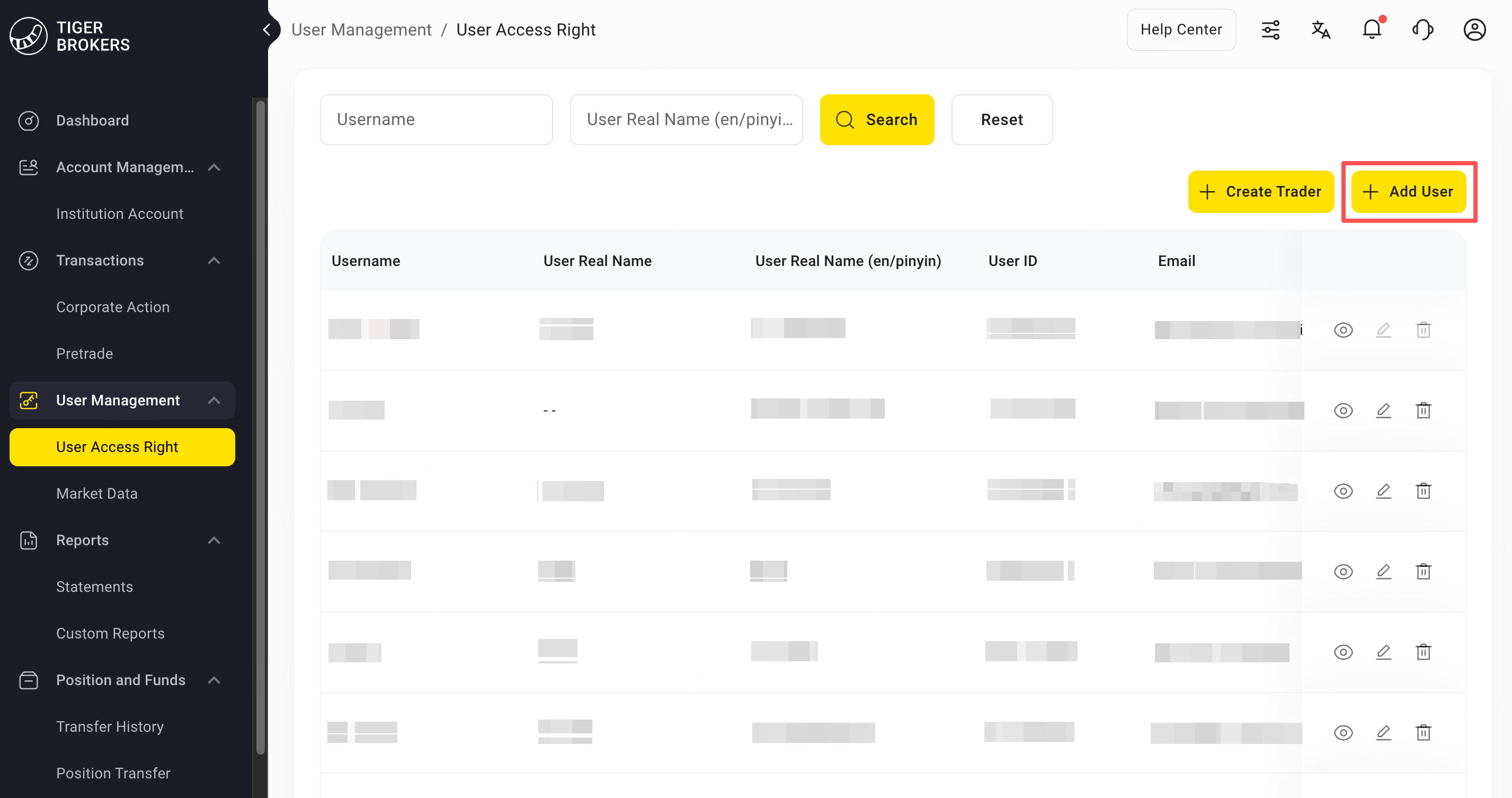
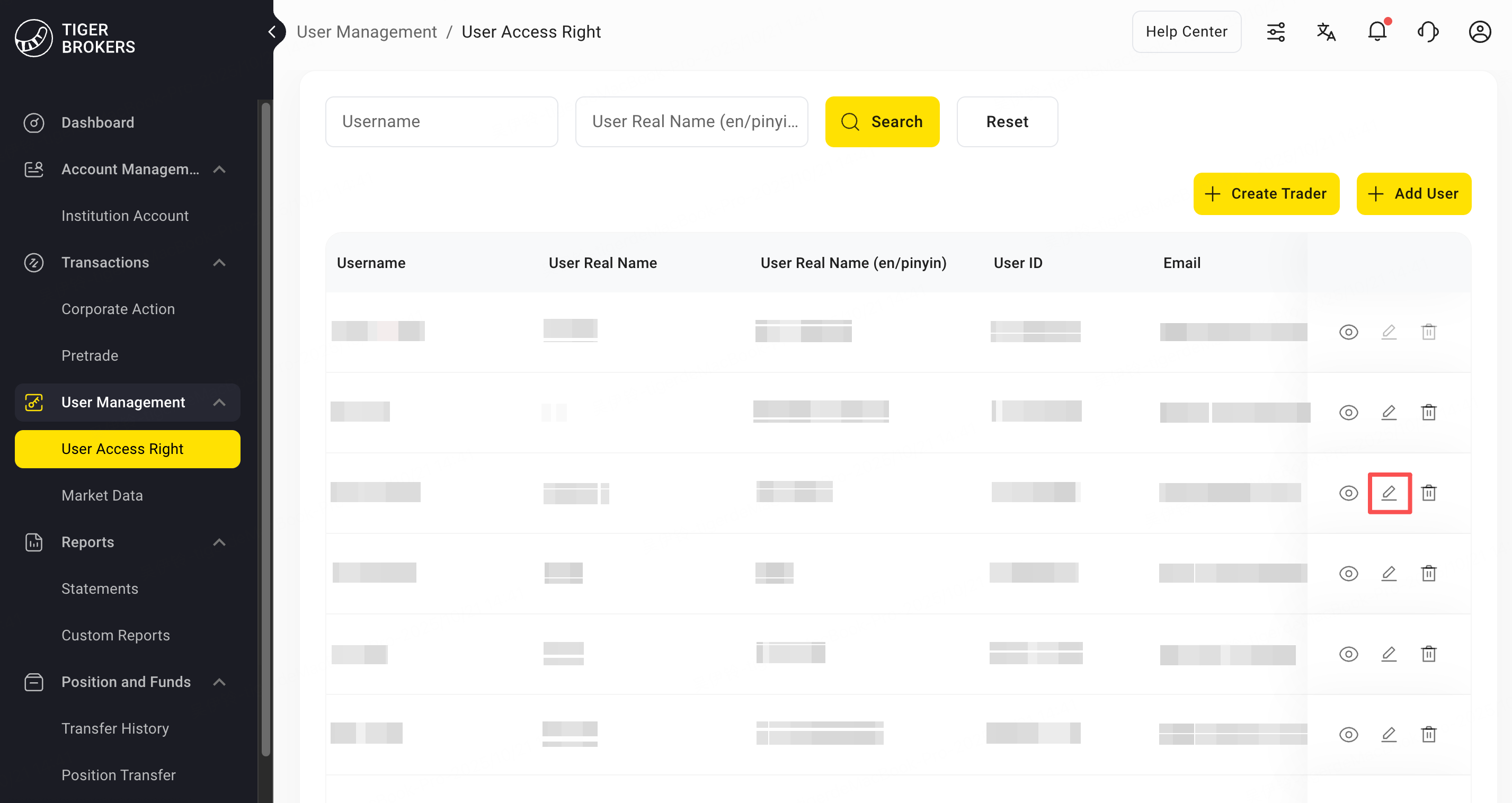
Each User ID corresponds to one Tiger ID, and each Tiger ID can establish one persistent connection. To use multiple persistent connections, create additional users under User Management > Manage User Permissions, then add their profiles from the API permissions page.
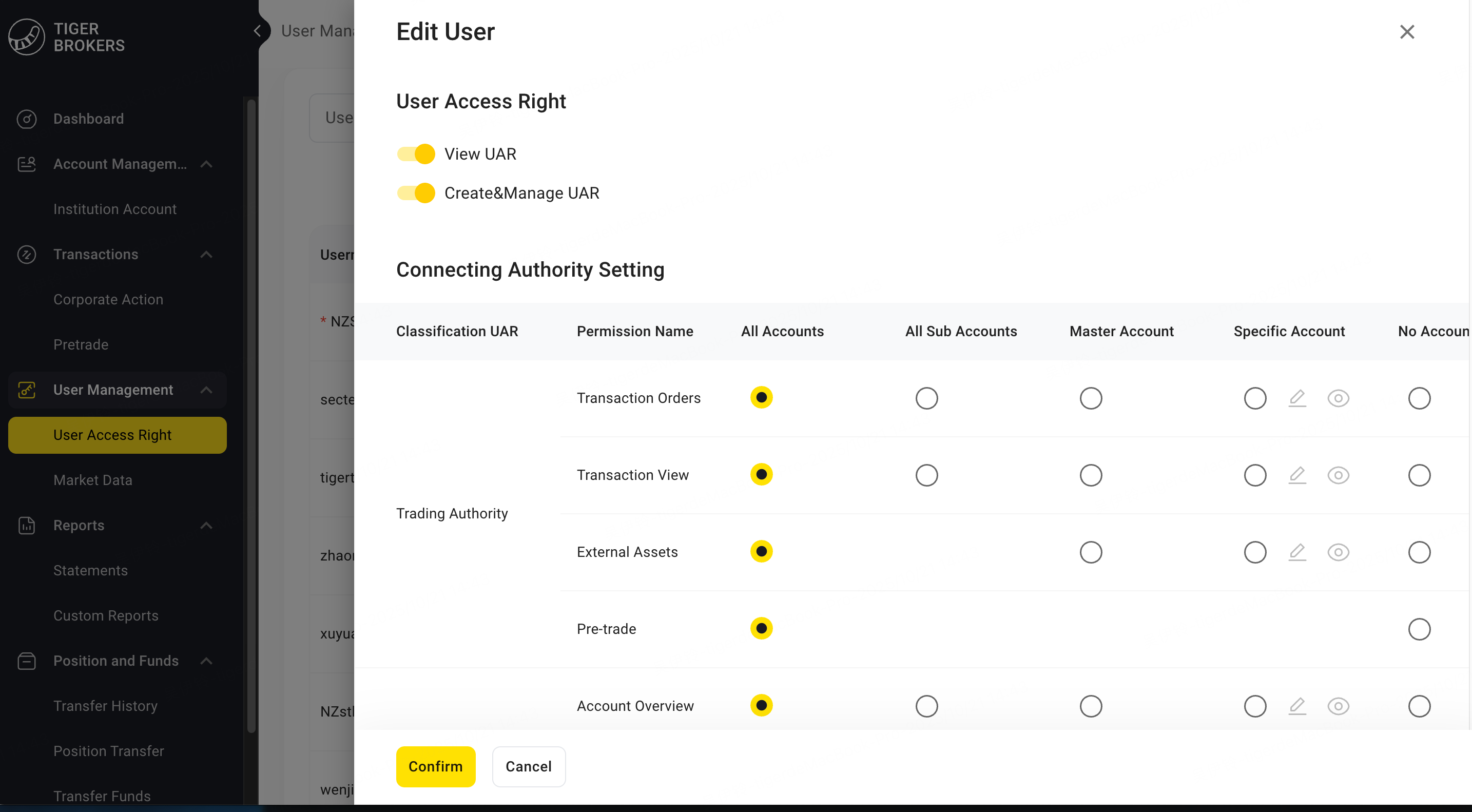
The API request permissions corresponding to each User ID are subject to the permission settings in the manage user permissions. You can limit the user's view, trading, assets and other permissions for each account according to roles.
Market Data Purchase (Optional)
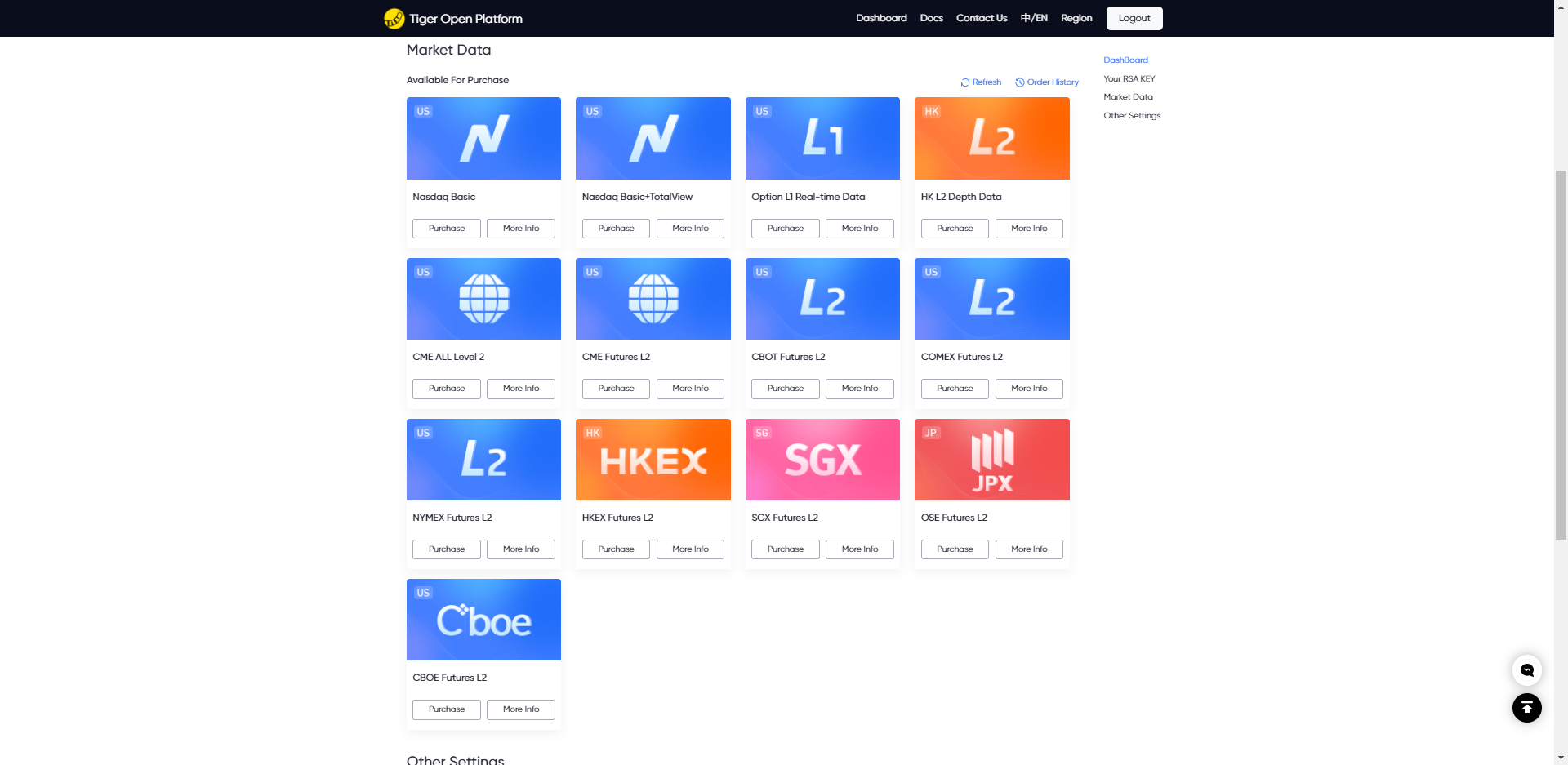
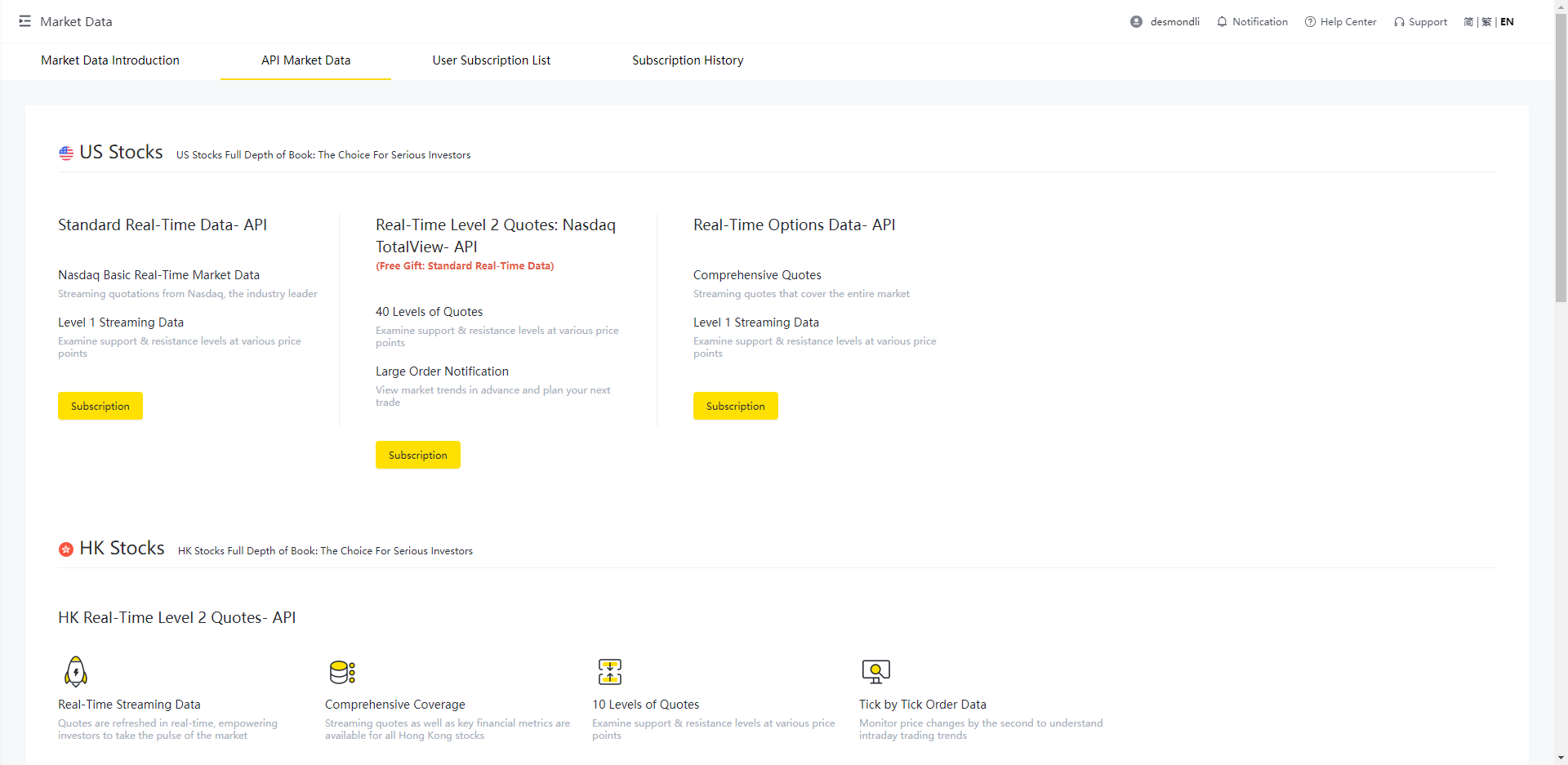
Delayed Market Data is available at no charge. Real-time Market Data requires a separate purchase, and Tiger OpenAPI market data access is independent of access purchased for the mobile or desktop app. Purchase the required OpenAPI market data access as follows:
Retail Customers
There are two purchase methods:
-
Log in to Personal Center to purchase market data
-
Purchase through the mobile APP: Tiger Trade APP - My - Market Data Permissions - OpenAPI Permissions
Institutional Customers
Purchase through Institutional Center - Market Data Permissions
API Configuration
Before making API requests, complete the client configuration. The developer information page lists the required values, including tigerId, account, license, and privateKey. Values in tiger_openapi_config.properties take precedence.
For Hong Kong stock licenses, the tiger_openapi_token.properties file is required and should also be placed in the path specified by configFilePath.
public static ClientConfig clientConfig = ClientConfig.DEFAULT_CONFIG;
public static TigerHttpClient client;
static {
        // Enable logging. log file name: tiger_openapi.2023-02-22.log
        ApiLogger.setEnabled(true, "/data/tiger_openapi/logs/");
        // ApiLogger.setDebugEnabled(false);        // Enable debug level logging
        // The tiger_openapi_config.properties file is stored in your local directory.
        clientConfig.configFilePath = "your_config_directory_path"; // your local directory
        // clientConfig.isSslSocket = true;         // default is true
        // clientConfig.isAutoGrabPermission = true;// default is true
        // clientConfig.failRetryCounts = 2;        // fail retry count, default is 2
        // clientConfig.timeZone = TimeZoneId.Shanghai; // default time zone
        // clientConfig.language = Language.en_US;  // default language
        // clientConfig.isAutoRefreshToken = false;  // default is false, only support 'TBHK' license
        // clientConfig.refreshTokenIntervalDays = 5; // default is 5; refresh the token every 5 days
        // clientConfig.refreshTokenTime = "12:30:00";  // default is empty, format: HH:mm:ss
        // clientConfig.secretKey = "xxxxxx";// Institutional trader secret key
        // clientConfig.token = "xx";        // Required two-factor authentication token for TBHK licenses

        // Old usage method (without tiger_openapi_config.properties file), must configure tigerId, defaultAccount, privateKey. If configFilePath is configured, properties file content takes priority
        // clientConfig.tigerId = "your tiger id";
        // clientConfig.defaultAccount = "your account";
        // clientConfig.privateKey = FileUtil.readPrivateKey("/Users/tiger/rsa_private_key_pkcs8.pem");
        client = TigerHttpClient.getInstance().clientConfig(clientConfig);
}
Configuration Description:
- clientConfig.configFilePath: Directory for storing tiger_openapi_config.properties and tiger_openapi_token.properties files
- clientConfig.tigerId: Developer ID (tiger_openapi_config.properties file configuration takes priority)
- clientConfig.defaultAccount: Trading account, can be either prime account or paper trading account (tiger_openapi_config.properties file configuration takes priority)
- clientConfig.privateKey: RSA private key generated on the page when registering developer information (tiger_openapi_config.properties file configuration takes priority)
- clientConfig.secretKey: Institutional trader secret key. Required for institutional users; individual users should not set this field
- clientConfig.token: Two-factor authentication token required for TBHK-licensed users
- clientConfig.isSslSocket: Whether persistent connections use SSL
- clientConfig.isAutoGrabPermission: Whether to claim market data device access for the current device once at startup
- clientConfig.failRetryCounts: API request failure retry count, maximum 5 times
- clientConfig.timeZone: Default time zone, used when requesting parameters
- clientConfig.language: Default language, used when requesting parameters
The clientConfig and client variables in the above example can be configured as global static variables and placed in a separate configuration class, then referenced directly where needed. This makes calling convenient while also reducing overhead.
Use OAuth2 authorization (individual users only)
The configuration above uses signature authentication and requires a private key. OAuth2 requires Java SDK >= 2.7.0 and does not use tigerId, a private key, or configFilePath. Institutional users must use signature authentication.
import com.tigerbrokers.stock.openapi.client.auth.oauth2.OAuth2Authentication;
import com.tigerbrokers.stock.openapi.client.auth.oauth2.OAuth2SessionManager;
import com.tigerbrokers.stock.openapi.client.config.ClientConfig;

OAuth2SessionManager sessions = OAuth2SessionManager.builder().build();
sessions.loginIfNeeded(url -> System.out.println("Complete authorization:\n" + url));

ClientConfig clientConfig = ClientConfig.DEFAULT_CONFIG;
clientConfig.authentication = new OAuth2Authentication(sessions);
Use clientConfig to create business clients. Trading requests must set clientConfig.defaultAccount to an authorized account.
Updated about 2 months ago